Choosing Your Matches
The filter bar across the top of the report does two different jobs. Some controls change which players you see; others change how each player's numbers are worked out. Keeping the two apart is the single most useful thing to understand on this page.

The two axes
| Control | Changes which players you see | Changes how the numbers are worked out |
|---|---|---|
| Tour (WTA / ATP / Challenger / ITF / Lower Level) | ✓ | – |
| Match Filter (Main Tour / Challenger / ITF) | ✓ | ✓ |
| In Play switch | ✓ | – |
| Tomorrow's Matches switch | ✓ | – |
| Period (Last 10 … 2 Years) | – | ✓ |
| Surface (All / Today's) | – | ✓ |
In short: Tour and the two switches change the list. Period and Surface change the stats. Match Filter narrows the list and the stats.
The controls
- Surface — All / Today's. All judges each player on their full record across every court type. Today's re-bases each player onto the surface they actually play on today, and switches the colour levels to that surface. Use Today's when you want a clay specialist judged on clay, not their mixed-surface record.
- Period — Last 10, Last 30, 30 Days, 90 Days, Cal Year, 1 Year, 2 Years. Sets the history window behind every percentage. A short window shows current form (fewer matches behind each figure, so it moves around more); a long window shows settled level.
- Tour buttons. Instantly show or hide today's matches by tier. They never touch the stat numbers — the percentages always come from each player's history per the Period and Surface you've chosen.
- Match Filter — Main Tour / Challenger / ITF. Narrows which tier of matches the whole table is built from, so it changes both which rows appear and how the stats are worked out.
- In Play and Tomorrow's Matches switches. Instantly show or hide those groups of matches — no reload. Neither affects the stat numbers.
"Last 10 / Last 30" relates to matches, not days
Last 10 = the player's most recent 10 matches, regardless of when they were played Last 30 = their most recent 30. A player with one match a week on Last 30 is showing roughly seven months of data. Use 30 Days or 90 Days if you want a fixed calendar window instead.
Filter recipes — good starting points
- Daily scan: Surface All, Period Last 30, all Tour buttons on, In Play and Tomorrow on — the broadest, steadiest view of the full day's card.
- Surface read: Surface Today's, Period Last 90 Days — each player graded on the court they're actually on today, with a reasonable sample.
- Pre-match planning: Tomorrow on, In Play off — the next day's known matches without the clutter of completed or in-play ones.
- Single tier: one Tour button active — a tidy, focused card for one level.
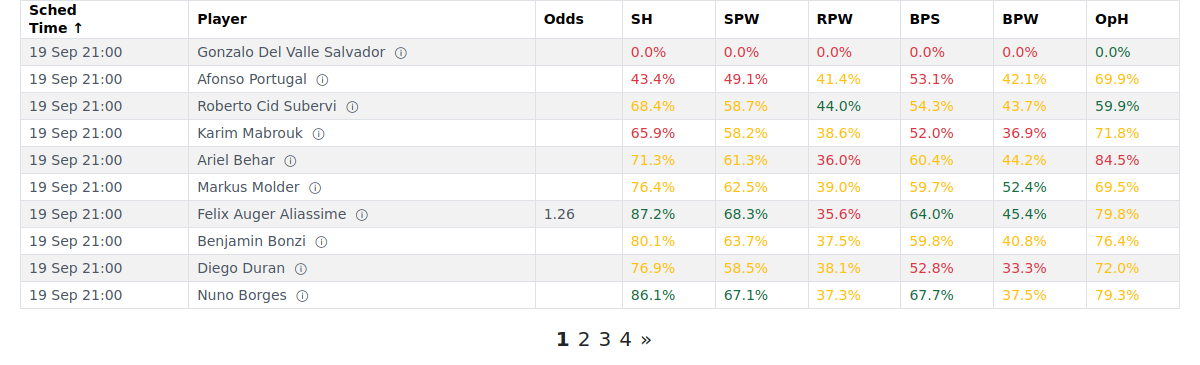
Compare the same card under each surface setting — same players, same order, only the colours change. Surface All grades everyone on their full record:
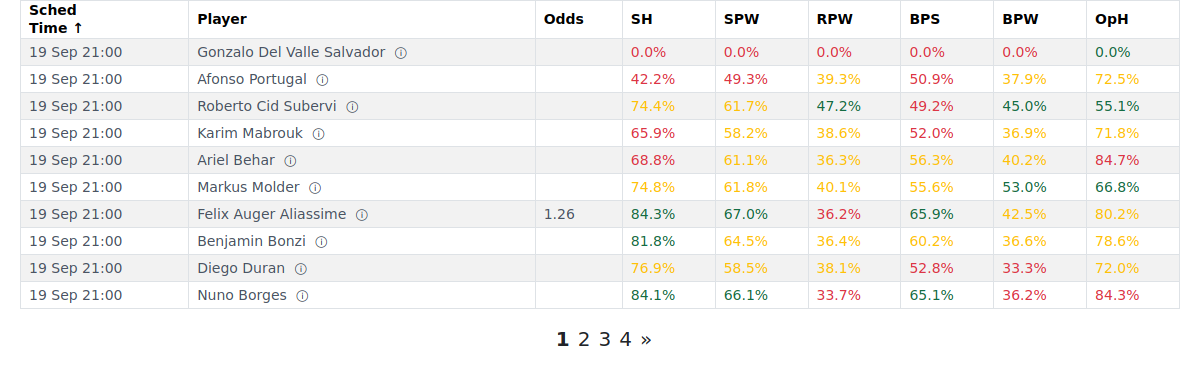
Surface Today's re-grades each cell against the surface that player plays on today — watch the colours shift:
Notes, tips & tricks
- Period + Surface combos: Last 30 + Today's = recent form on today's surface, good when a player has just switched courts. 2 Years + Today's = settled long-run level on that surface, better for patterns that hold across seasons.
- The In Play and Tomorrow switches are helpful — turn In Play off to focus on upcoming matches, turn it back on to check matches already underway.
- Your filter choices are remembered next time you open the report.
- Empty table? Your filters are too narrower or you may have a player name entered. Widen Tour or Match Filter and check the search box is clear.

FAQ
What's the difference between the Tour buttons and the Match Filter? The Tour buttons (WTA / ATP / Challenger / ITF / Lower Level) instantly show or hide matches on screen by tier — they never touch the stat numbers. Match Filter (Main Tour / Challenger / ITF) goes deeper: it narrows which tier of matches the whole table is built from, so it changes both which rows appear and how the stats are worked out.
Do the Tour buttons change the stat numbers, or just which matches show? Just which matches show. The percentage figures are based on each player's history as set by Period and Surface. Toggling the Tour buttons doesn't change a single cell value.
Does Period change which matches I see or how the stats are worked out? How the stats are worked out. Period sets the history window behind every percentage. It doesn't control which players appear on today's card — that's Surface, Tour, and Match Filter.
What does "Last 10 / Last 30" count — days or matches? Matches. Last 10 = the player's most recent 10 matches regardless of when they were played; Last 30 = their most recent 30. The other options — 30 Days, 90 Days, Cal Year, 1 Year, 2 Years — are calendar windows.
Why did the colours change when I switched Surface to "Today's"? Each surface has its own colour levels. "Today's" grades every cell against the levels typical for the surface that player actually plays on today — not an all-surface average. A value that's ordinary across all courts might be strong (or weak) on a specific surface.
What do the In Play and Tomorrow's Matches switches do? They instantly show or hide that group of matches — no reload needed. In Play covers matches currently in progress; Tomorrow's Matches shows the next day's card. Neither switch affects the stat numbers.
What's a good starting set of filters for a normal day? Surface All, Period Last 30, all Tour buttons on, In Play on, Tomorrow on. That's the broadest, steadiest view of the full day's card. Narrow from there once you know what you're looking for.
Why does the card get smaller later in the day? With In Play on (the default), matches that have started stay in the list throughout play. If you've turned In Play off, those rows disappear as matches kick off. Turn In Play back on to see them.
Can I look at just one tour — for example, ATP only? Yes. Click the ATP Tour button so only that tier is highlighted. The change is instant. Click other buttons to add them back.
I want only Main-tour matches, computed on that basis. Which control? Use Match Filter → Main Tour. That builds the table from Main Tour matches only, so both the rows and the underlying numbers narrow accordingly. The Tour buttons alone would only hide or show rows — the stats would still use the full history.