Overview
The Trading Stats Report is a single screen listing every player on today's and tomorrow's singles card, with the stats you need to judge a match at a glance. It contains one table with five strategy views, and traffic-light colours that immediately highlight who is of interest.
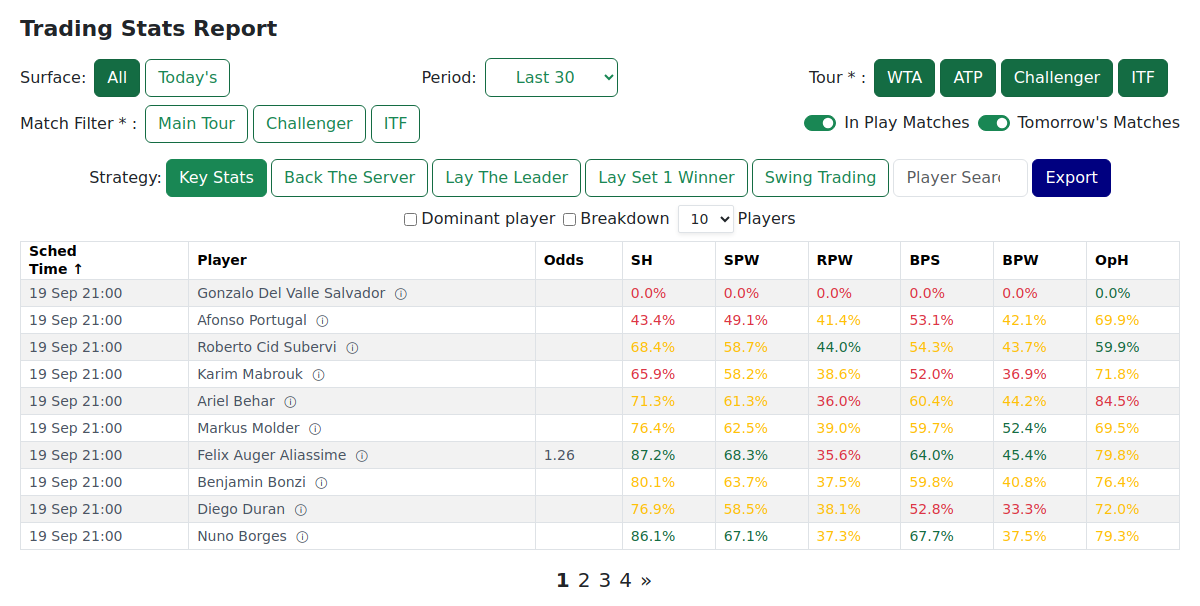
How the page is laid out
- A filter bar across the top decides which matches you see and how each player's numbers are worked out. See Choosing Your Matches.
- A Strategy selector swaps the block of stat columns for a different trading angle. See The Five Strategy Views.
- The table itself: one row per player, coloured green / amber / red so the picture reads instantly. See Reading the Colours.
Reading a row
Every player on the card gets their own row. Three columns are always visible, whichever strategy view is active:
| Column | What it shows |
|---|---|
| Sched Time | When the match is scheduled to start, in your own local time zone. |
| Player | The player's name, with an ⓘ icon that opens their full stats page. |
| Odds | The player's decimal price. Lower = favourite. A dash means no price yet. |
Everything to the right of these three swaps when you change the strategy view.

Because each row is a player, a match appears as two rows — one for each side. Click either row to pin both players to the top together, the cleanest way to compare a specific match.
Notes, tips & tricks
- The ⓘ icon next to a name opens that player's full match stats page in a new tab — dig into their history without losing your place in the report.
- Switching strategy views doesn't reset your filters, pinned player, or sort order. Work through all five views for the same match without re-doing any setup.
- Start on Key Stats for the all-round picture (serve hold, points won, break points). Once something stands out, switch to the specialist view that matches the angle.
- Your view stays exactly as you left it — nothing shuffles under you while you read. Reload the page whenever you want the latest figures.
FAQ
Why do I see tomorrow's players as well as today's? The report covers both today's and tomorrow's matches so you can scan ahead and plan. To see today only, turn off the Tomorrow's Matches switch at the top right.
Why does each match appear as two rows? Each row belongs to a player, not a match — so you can read one player's stats directly. Both players in the same match are listed separately. Click either row to pin them together at the top for side-by-side reading.
How do I open a single player's full page from here? Click the ⓘ icon next to their name. Their match stats page opens in a new tab; from there clicking a player's name will show their individual stats. Return to the report when done.
How current are these numbers, and how do I get the latest? The report is kept up to date through the day. Your view stays put until you reload — reload the page any time to pull in the latest figures.
What time zone are the scheduled times in? Your own. Every match time is shown automatically in your local time zone, detected from your device — so a match starting at 2pm local reads "14:00" to you and adjusts for anyone watching from another country. There's nothing to set. But be aware that tennis matches often do not start on time!
What's the quickest way to scan the whole day? Set Players per page to All, keep the sort on Sched Time (the default), and work through the card on Key Stats top to bottom. When a player or match catches your eye, click the row to pin it, then step through the other views — your setup stays intact.
Can I get back to where I was if I reload? Yes. Your Surface, Period, Tour, Match Filter, Players per page, and the Dominant player / Breakdown toggles are all remembered on your device automatically. They'll be waiting exactly as you left them next time you open the report.