Reading the Colours
The traffic-light colours are the headline feature of the report. Every stat cell is coloured against the levels typical for that player's tour tier and surface, so the picture reads at a glance without you having to know the numbers.
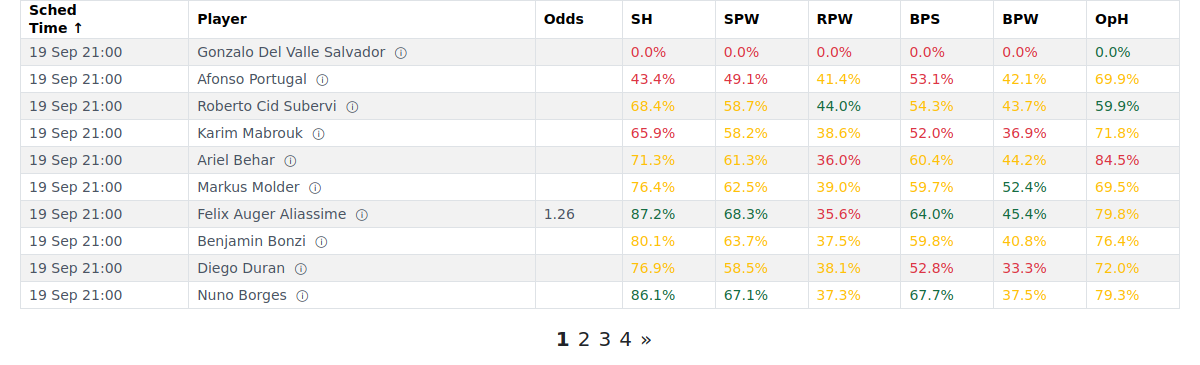
Green, amber, red
- Green — this player's figure is strong relative to what's typical at their tour level and on this surface.
- Amber — average level of performance for this tour/surface.
- Red — below typical for this tour/surface.
The scale is calibrated per tour tier and surface, not one universal threshold — so the same raw number can be green at Challenger level but amber at ATP.
OpH is the exception. Opponent Hold % is good when low, so its colours are reversed: green = low, red = high. If a cell looks green for a low number, check the heading — if it's OpH, that's correct.
Colours shift with Surface
Setting Surface to Today's grades each cell against the levels for the surface that player plays on today. The number stays the same; it's being judged against a surface-specific benchmark instead of the all-surface one — which is why a cell can change colour when you switch. See Choosing Your Matches.
Colour levels are also reviewed periodically and can shift over time. Read the colours as a relative guide, not an exact threshold.
Dominant player
Turn on Dominant player to highlight the stronger of the two players in each stat cell and show the +gap to the opponent. "Stronger" means the better figure for that stat — so for OpH, the lower value is highlighted. A larger gap means a clearer head-to-head edge on that specific stat.
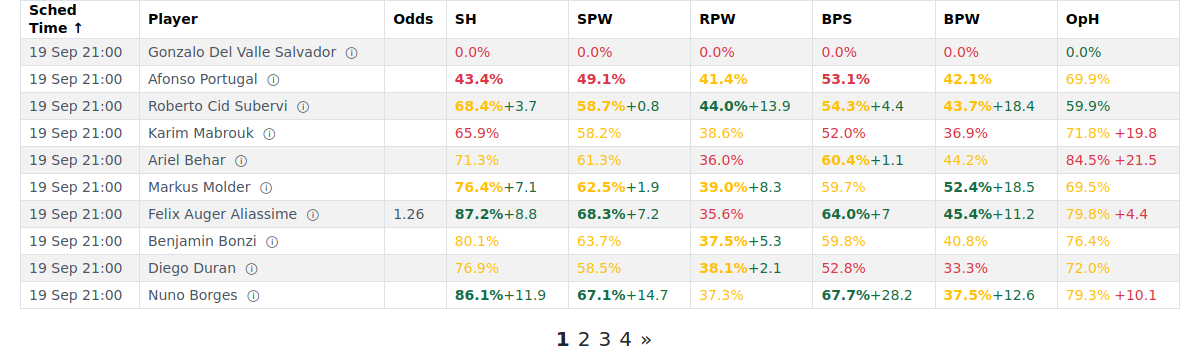
Breakdown
Turn on Breakdown to show the raw (wins / total) counts behind each percentage. The first number is how many times the outcome happened; the second is how many times it could have. The more data points behind the figure, the more weight you can put on the colour.
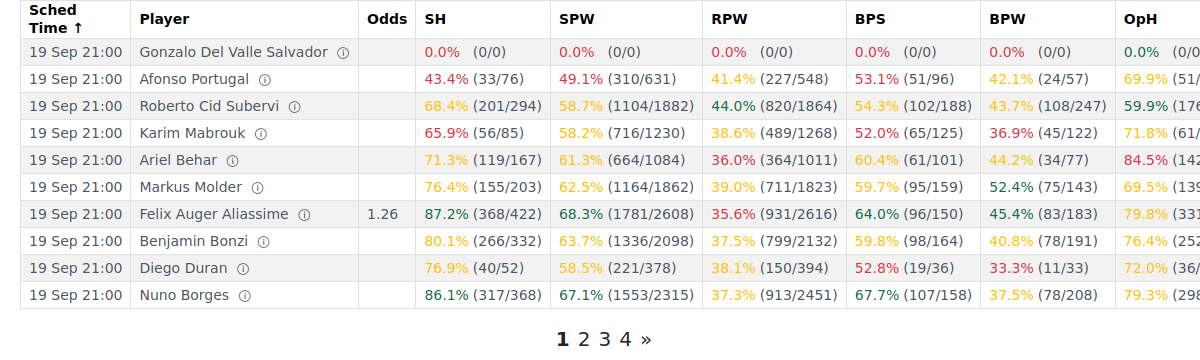
Both toggles are remembered on your device.
Notes, tips & tricks
- Combine Dominant player + Breakdown for the sharpest read. Dominant player shows who wins each stat and by how much; Breakdown shows how firmly that edge is backed by history. A bolded +8% from 100 data points is a real edge; the same gap from 6 data points is a suggestion, not a conclusion.
- Short window + specialist view + Breakdown = quality check. On a set-pattern view with a short Period, open Breakdown to see the counts. Set patterns fire far less often than points or games — low counts are normal; read the % in context.
- A cell with no colour means there aren't enough matches in the chosen window to grade that stat yet. Widening the Period or switching Surface to All usually brings the colour back.
FAQ
What do the green / amber / red colours mean? Green = this player's figure is strong relative to what's typical at their tour level and on this surface. Amber = about average for the tour/surface. Red = below typical. The scale is calibrated per tour tier and surface, not one universal threshold.
Why is the same number green for one player and amber for another? Colour levels vary by surface and tour tier. A 65% hold rate might be strong at ITF level on clay but ordinary at ATP Main Tour on grass — so the identical figure earns different colours in different contexts.
Why did a cell's colour change when I switched to "Today's" surface? "Today's" grades each cell against the levels for the surface that player plays on today. The number stays the same; it's being judged against a surface-specific benchmark instead of the all-surface one.
Why is a low OpH green — isn't low bad? OpH is Opponent Hold % — how often the opponent holds their serve when facing this player. A low figure means the opponent struggles to hold, which is good for the player being rated. So green = low is correct. Every other stat works the usual way (green = high); OpH is the one exception.
What does Dominant player do, and what is the bolded/highlighted value? When Dominant player is on, the stronger of the two players in each stat cell is shown in bold. "Stronger" means the better figure for that stat (so for OpH, the lower value is bolded).
What does the +gap next to a bolded value tell me? The difference between the two players on that stat — the bolded player's figure minus the opponent's. A larger gap means a clearer head-to-head edge on that specific stat.
What do the two numbers in a breakdown like (394/522) mean? The first number (394) is how many times that outcome happened; the second (522) is the total times it could have. The percentage shown is the first divided by the second. More events behind the numbers = more reliable %.
Can I trust a green cell that's based on very few matches? Use it as a signal, not a verdict. Turn on Breakdown to see the counts — a player who's 4/4 on break points saved is 100%, but four situations is a thin basis. The more data points behind the %, the more weight you can put on the colour.