Build a Rule
A rule is a single condition a match must satisfy for your system to bet on it. You can stack several rules together — a match has to pass all of them.
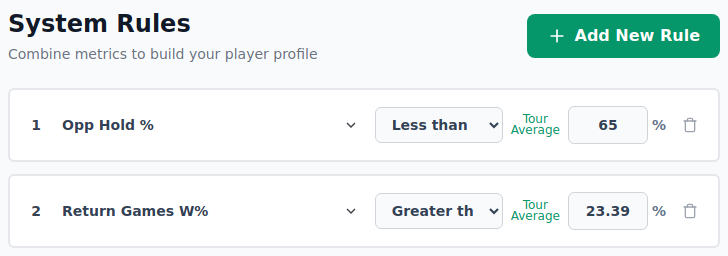
Anatomy of a rule
Every rule is made of three parts:
- Metric — the thing you're measuring (e.g. Service Games Won %).
- Operator — how to compare it (greater than, less than, between).
- Value — the number to compare against.
Read together they form a sentence:
Service Games Won % is greater than 70.

Left to right, a rule card has: the metric name (a dropdown), the
operator, a Tour Average shortcut, the value box with a % sign, and
a trash icon to delete the rule.
Adding your first rule
- Click Add New Rule (top-right of the Rules panel). It's greyed out until any half-finished rule is completed — hover it for a reminder.
-
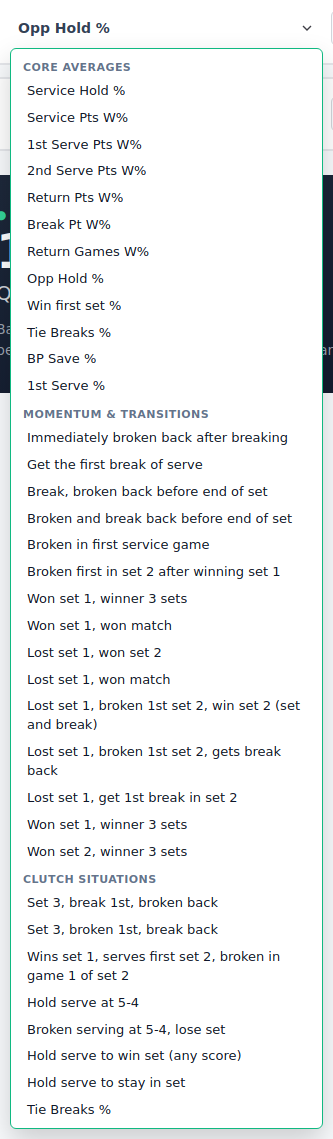
Pick a metric from the dropdown. Metrics are grouped — Core Averages, Momentum & Transitions and Clutch Situations — so related stats sit together. Not sure what one means? See the Metric Glossary. A metric already used in another rule is greyed out so you can't pick it twice.
- Choose an operator:
- Greater than (≥) — the value must be at least your number.
- Less than (≤) — the value must be at most your number.
- Between — opens a second box so you can set a low–high band.
- Type the value (a percentage from 0 to 100). Press Tab or click away to apply it.
The match count updates as you go, so you can see straight away how selective your rule is.
The Tour Average shortcut
When a surface and gender are chosen, a small Tour Average link appears on the rule. Click it to auto-fill the value with the tour average for that metric — a sensible starting point you can then nudge up or down.
Combining rules
Add more rules to tighten the system. Each new rule makes it stricter, because a match must pass every rule:
| Rules | Effect |
|---|---|
| One broad rule | Lots of matches, low confidence |
| Two or three focused rules | Fewer matches, clearer edge |
| Many narrow rules | Very few matches — often too few to trust |
If your match count drops to almost nothing, remove your most restrictive rule and try again.
Editing and removing
- Change any dropdown or value to update a rule in place — the count re-checks automatically.
- Click the trash icon on a rule card to delete it. A completed rule asks you to confirm first; an empty one is removed straight away.
Tips
| Tip | Why it matters |
|---|---|
| Use Tour Average as a starting point | It's a reasonable threshold — adjust up or down from there. |
| One to three rules usually enough | More rules = fewer matches and risk of over-fitting to coincidence. |
| Watch the match count drop | If it falls below 5–10, your rules are too tight; loosen the worst one. |
| Avoid "perfect" metrics | A player with 100% over two matches is luck, not edge. Use min matches filter. |
Next step
Once your rules describe the matches you care about, it's time to test them. Continue to Run a Backtest, or go back to Getting Started.