Filters
Rules describe how a player behaves. Filters decide which matches and players are even considered in the first place. They live in the left-hand sidebar and apply to everything — the live matching count, the backtest, and any system you save.
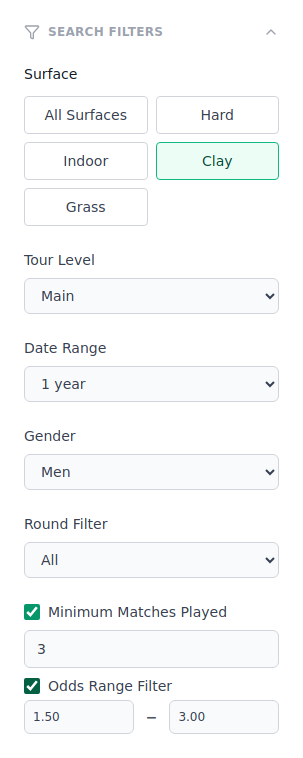
Search Filters
Open the Search Filters panel (the funnel icon) to narrow the pool:
| Filter | What it does |
|---|---|
| Surface | Limit to Hard, Indoor, Clay or Grass. Leave open to include all. |
| Tour Level | Main tour, Challenger, or ITF. Levels play very differently. |
| Date Range | How far back to look: last 30 days, 90 days, 1 year or 2 years. |
| Gender | Men's or Women's matches. |
| Round | Only a specific round, e.g. Final or First Round. |
Surface buttons
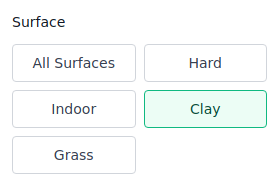
Surface is a row of buttons rather than a dropdown. Click All Surfaces to include everything, or pick a single surface. The selected button is highlighted.
Minimum Matches Played
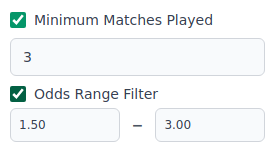
Tick Minimum Matches Played to ignore players with too little history. A player who has played only one match in the period can show a misleading 100% on some metric — this filter demands a real sample before they qualify.
- Default when enabled: 3 matches.
- Higher values = more reliable players, fewer of them.
Use this whenever a metric looks suspiciously perfect. A big number over a tiny sample is noise, not an edge.
Odds Range Filter
Tick Odds Range Filter to keep only bets inside a price band. Enter a Min and a Max (decimal odds).
- Default when enabled: 1.50 – 3.00.
- Use it to match your real betting strategy — e.g. avoid heavy favourites (below 1.50) or long shots (above 3.00).
A system's ROI can change completely once you restrict the odds. Test with and without this filter to see where the edge really is.
Match Stats Filters
There's a second panel: Match Stats Filters. It controls the context the metrics are measured in, which can differ from the matches you bet on.
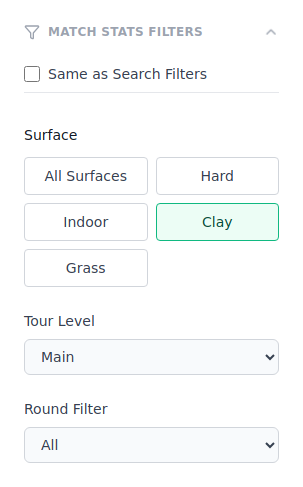
- Same as Search Filters (ticked by default) — measure each player's metrics over the exact matches your search already selected. Simplest, and right for most systems.
- Untick it to measure metrics on a different surface, tour level or round. Example: find players whose clay form fits, but bet them on any surface.
If you're not sure, leave Same as Search Filters ticked. Only untick it when you deliberately want form from one context applied to bets in another.
Tips
| Tip | Why it matters |
|---|---|
| Start with 3+ min matches | Single matches are unreliable — even a 100% stat is noise. |
| Test multiple surfaces | A system that only works on clay may be coincidence, not edge. |
| Try both filter modes | Same vs. different match stats can reveal if form transfers to other conditions. |
| Odds range = betting reality | Always test within the odds band where you'd actually bet. |
Next step
With filters set and rules built, run the numbers. Continue to Run a Backtest.