Save a System
Once a system looks promising, save it. Saved systems are kept in the sidebar so you can reload them any time and see how they're doing against today's matches.
Saving
The Save System button sits in the green header bar. It only appears once you have at least one valid rule.

- Click Save System.
- Give it a name — at least three characters. A good name describes the idea, e.g. "Clay, Main, Return Games > 35".
- Click Save.
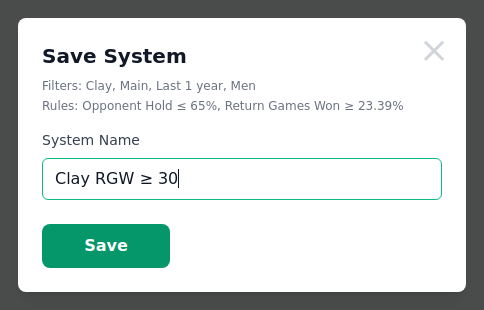
The dialog shows the Filters and Rules being saved, so you can confirm you're keeping the right combination. The Save button stays disabled until the name is long enough and unique.
Names must be unique. If you reuse one, the tool warns you before saving.
Your Saved Systems
Saved systems appear under Saved Systems in the right sidebar.
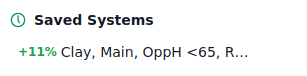
To help you get your bearings, the sidebar starts with one example system already saved — click its name to load its filters and rules and see the whole flow in action. Delete it whenever you like once you've saved your own.
Each row shows:
- a coloured ROI badge — green for profit, red for loss — from the last time the system was measured;
- the system name. Hover it to see the full filters and rules.
| Action | How |
|---|---|
| Load a system | Click its name — rules and filters are restored. |
| Rename / update | Hover the row and click the pencil icon. |
| Delete | Hover the row and click the trash icon, then confirm. |
The pencil and trash icons appear when you hover a row (or on the row you last loaded). If you have more than five systems, use Show all to expand the list and Show less to collapse it again.
Keeping systems fresh
When you load a saved system, the tool re-checks it against current matches and updates its stats. That's why the ROI badge can change over time — it always reflects the latest data, not the day you saved it.
Tips
| Tip | Why it matters |
|---|---|
| Name by the edge, not the result | "Clay, 35+ RGW" is clearer than "Good system #3". |
| Save early, often | Test many ideas. You can delete them later. |
| Watch the ROI badge change | Systems age as new data arrives. An old edge may fade. |
| Reload before betting | Click a saved system to update its stats against today's matches. |
Next step
Want to know which of today's matches your systems pick out right now? Continue to Live Matching.