Run a Backtest
A backtest replays your rules against real historical matches and shows you how the system would have performed. It's the moment of truth for any idea.
Before you run
As soon as your rules are valid, the Live Matching card updates on its own and shows a Qualifying Players count — how many of today's players currently fit your profile. You don't have to do anything to trigger it.
When you're ready to see the full history, click Run Full Backtest.
If the button is greyed out, your rules match either zero players or too many. Adjust a rule or a filter and the count will refresh.
The toolbar buttons

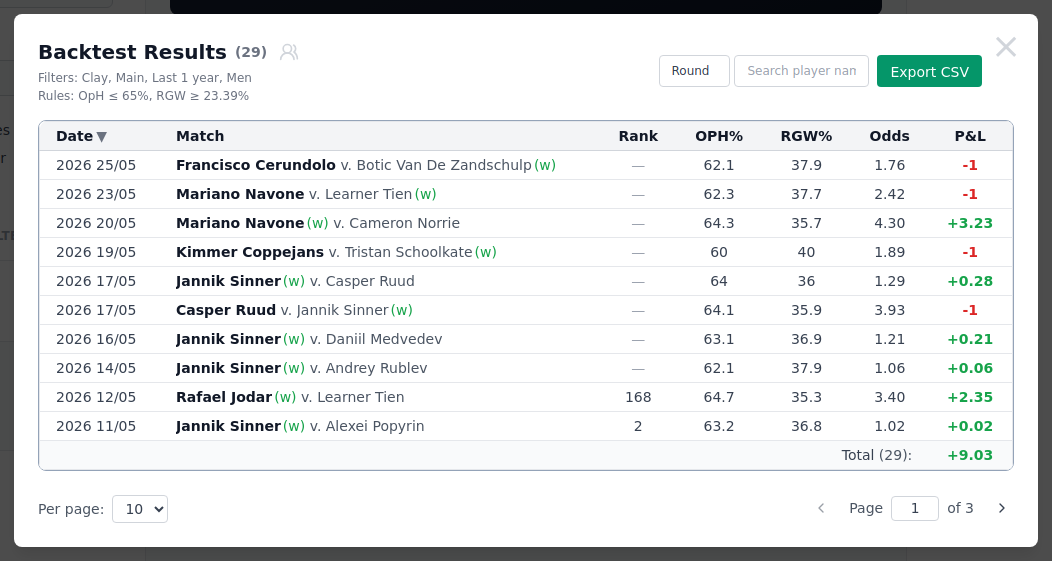
The Backtest Results window opens with the match count at the top and a short summary of the Filters and Rules you used, so you always know exactly what was tested. Along the top you can narrow the results further without re-running the backtest:
| Control | What it does |
|---|---|
| People icon (next to the count) | Opens the full Qualifying Players list. |
| Surface / Tour Level / Round | Drop-down filters — tick the values to keep. Only appear when the results span more than one option. |
| Player search | Type a name to find matches involving a specific player. |
| Backed only | Appears while searching a player — see below. |
| Export CSV | Downloads the currently-shown results as a spreadsheet. |
The filter dropdowns
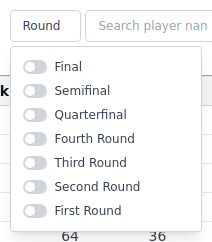
Click Surface, Tour Level or Round to open a panel of toggles. Flip on as many values as you like; the table updates instantly. A small × clears the whole filter, and the button turns green while any value is selected.
Backed only
When you type a player's name into the search box, a Backed only switch appears next to it:
- On (default) — show only the matches where your system actually backed that player. This is the honest view of how the system did on them.
- Off — show every match involving that player, whether the system backed them or their opponent.
Turn it off when you want to see both sides of a player's matches; leave it on to judge your system's own picks.
Export CSV
Export CSV saves exactly what's on screen — including any surface, tour, round
or player filtering you've applied, and in the current sort order — as a .csv
file you can open in Excel or Google Sheets. Use it to keep a record, chart the
results yourself, or share a system's history. It's disabled when the current view
has no rows.
Paging through matches

At the bottom, Per page sets how many rows show at once (10, 20 or 50). Use the ‹ / › arrows or type a page number to jump around a long result set.
Reading the results table
The results tell you whether your idea actually made money.
The headline numbers
The window title shows the match count in brackets. Read the table against these four ideas:
| Stat | Meaning |
|---|---|
| Count | How many matches the system bet on. |
| Win Rate | Share of those bets that won. |
| ROI | Return on investment — profit per unit staked, as a percentage. |
| Profit | Total profit or loss, in points (units). |
ROI is the number that matters most. A positive ROI over a large Count is a system worth watching. High profit from very few matches can just be luck.
The match-by-match table
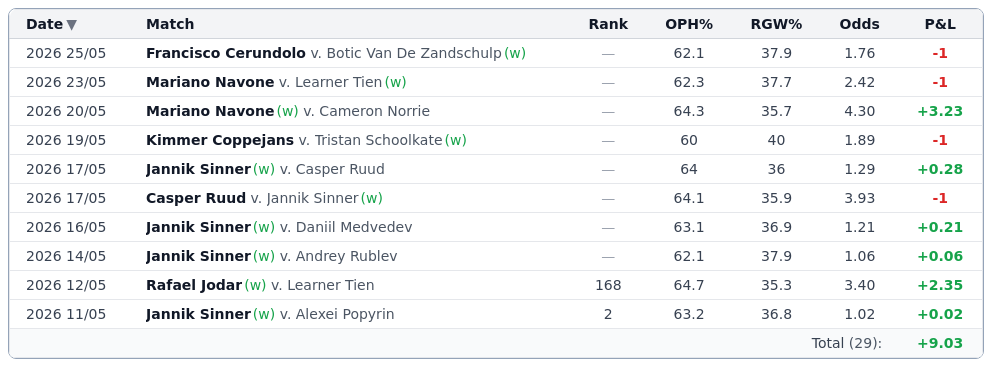
Each row is one bet the system placed. The columns are:
- Date — when the match was played.
- Match — the player your system backed, then
v.the opponent. A green (w) marks the winner of the match. - Rank — the backed player's official ranking at the time.
- Metric columns — one per rule, showing that player's value for the metric (as a %). Hover a cell to see the raw count behind it.
- Odds — the price the backed player was available at.
- P&L — profit or loss on that bet: green for a win, red for a loss.
The Total row at the bottom adds up the P&L across every completed match.
Sorting and digging in
- Click any column header to sort by it; a ▲/▼ arrow shows the direction. Click the same header again to reverse it.
- Click a player's name to open that match on the main stats site in a new tab.
- Use the toolbar filters and Per page control (above) to slice a long table down.
Result limits
To stay fast, the tool caps how many matches it returns. If your system is very broad you'll see a note that results were limited — tighten your rules to get a sharper, complete picture.
A backtest with only a handful of matches isn't reliable. Aim for a healthy sample before trusting the numbers.
Tips
| Tip | Why it matters |
|---|---|
| ROI > Profit | High profit on 5 matches can be luck; ROI over 20+ matches is more believable. |
| Filter the results | Use the toolbar filters to break results by surface or tour — see if the edge is consistent. |
| Export for a record | Save your backtest results as CSV so you can compare later if the rule changes. |
| Re-run after backtest | Rules don't change, but markets do. If a system performed well, test it live too. |
Next step
Found a system worth keeping? Continue to Save a System, or go back to Build a Rule.