All Matches tab
This is the default landing tab and the one most people use every day. It lists every match for the selected day, with filters to narrow the list and one-click access to each match's full page.
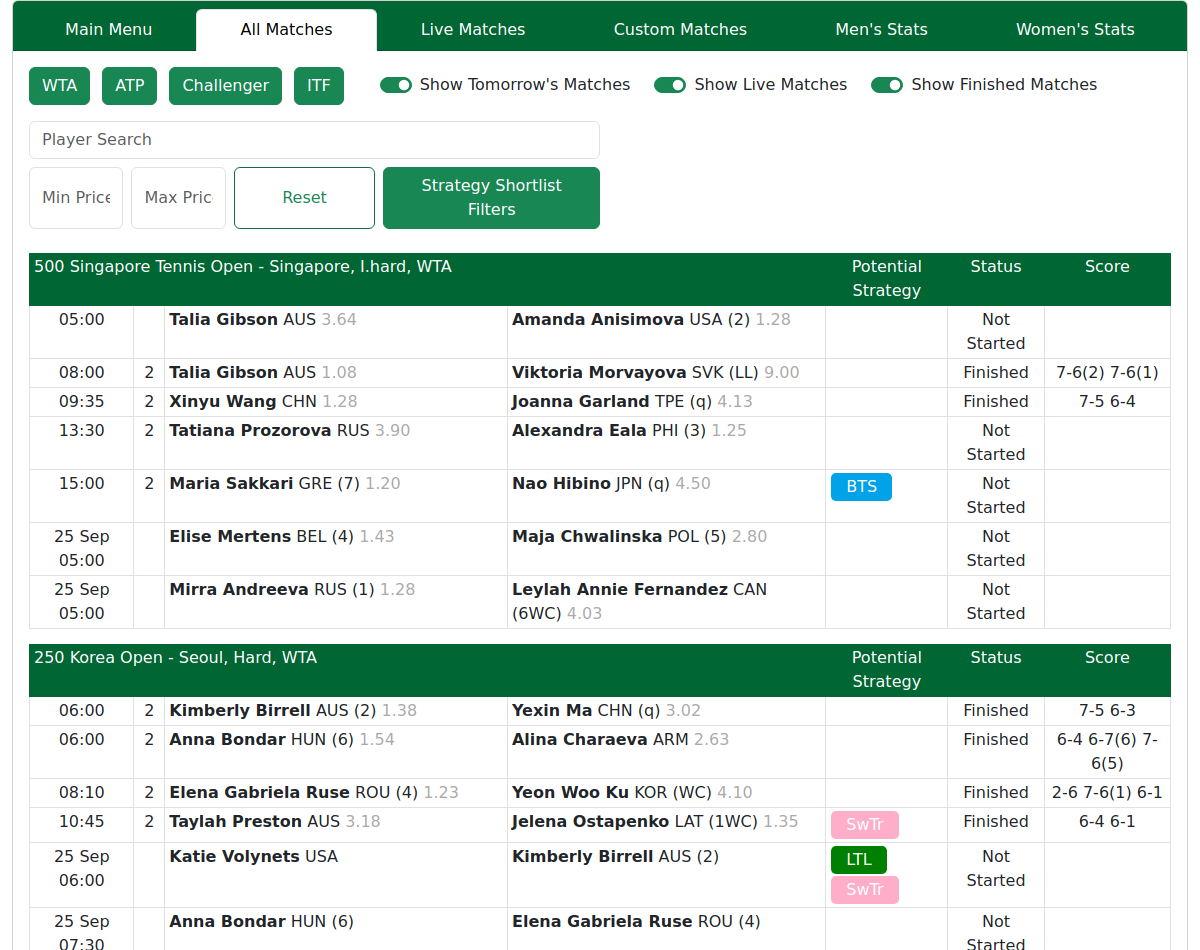
Reading a row
Left to right, each row shows:
- Time — in your own local time. Plain
HH:mm= today; a date prefix (e.g.3 Sep 14:30) = a different day. - Round — how deep into the event the match is (see the table below).
- Players — name, 3-letter nationality, and an entry tag in brackets.
- Odds — a decimal price per player; lower = favourite.
- Potential Strategy — any trading strategies our algorithm believes might fit.
- Score — set by set, for live and finished matches.
The round column

| Shown | Meaning |
|---|---|
PreQ |
Pre-qualifying |
Q1 / Q2 / Q |
Qualifying rounds (Q = final qualifying round) |
1 / 2 / 3 / 4 |
Main-draw rounds (4 = last 16 at big events) |
QF |
Quarter-final (last eight) |
S |
Semi-final (last four) |
F |
Final |
B |
Play-off for third place |
R |
Round-robin group match |
R1–R5 |
An individual match within a team tie |
| (blank) | Round not recorded |
A bare
1or2in the round column means first/second round. A number in brackets next to a name —(1),(2)— is a seed, which is different. See below.
The tag after a player's name
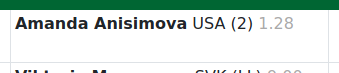
The bracket tag is the player's entry status in that tournament. A plain number is their seed; a letter code is how they got in. The tag is tournament-specific, so the same player can show a different tag at another event.
| Tag | Meaning |
|---|---|
1, 2, 3 … |
Seed number — one of the top-ranked players in this event; (1) is the top seed |
Q |
Qualifier — won extra matches beforehand to get in |
WC |
Wildcard — given a free place by the organisers |
LL |
Lucky loser — lost in qualifying but got in when someone withdrew |
ALT |
Alternate — a stand-in who took an open spot |
PR |
Protected ranking — returning from long injury on an old ranking |
SE |
Special exempt — excused from qualifying |
JR / JE |
A junior-ranked player in the draw |
1WC … |
Seeded and entered on a wildcard |
Reading the score
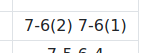
The score reads set by set, left to right: 6-4 2-6 1-1 = first set 6–4,
second set 2–6, third set currently 1–1. Within each set the first number is
the top player on the row, the second is the opponent. A set with no score
yet is not played. A (5) in brackets after a set is the losing tie-break score
(e.g. 7-6(5)). ret. means a player retired — the match ended early.
The filters

-
Tour type — WTA, ATP, Challenger, ITF, Lower Level. When a tour blob is green that tour has been selected. If it's white, it has been de-selected. See Tour-type filters — a worked example.
-
Time — Show Tomorrow's Matches, Show Live Matches, Show Finished Matches. These are normal "show" switches: each toggle includes or removes that group. See Time filters below.
-
Strategy Shortlist — a dropdown of trading strategies (Back The Server, Lay The Leader, Lay Set 1 Winner, Swing Trading). Narrows the list to matches that fit a strategy you pick. See The Strategy Shortlist filter below. (Not on every account; hidden on the Live tab.)
-
Player Search — a name search that matches either player in a row.
-
Min / Max price — an odds band that keeps a row if either player's price falls inside it.
The Strategy Shortlist filter
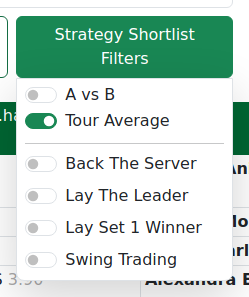
The Strategy Shortlist is a dropdown of trading strategies. Use it to shortlist the day to only the matches that fit a strategy you're interested in.
How to use it: open the dropdown and tick one or more strategies. The list then shows only matches that fit — a match qualifies if any ticked strategy applies to it (tick more to widen the shortlist, not narrow it).
The four strategies are highlighted in the 'Strategies' section of the site.
The tags are auto-created and flag matches worth a look; they don't tell you what to back or lay. Full stat detail is in Reading Stats & Filters.
Comparison Mode: Tour Average or A vs B
Inside the dropdown there is also a two-option switch: Tour Average and A vs B. This changes what the strategies are measured against.
-
Tour Average — each player's stats are compared to the typical player on that surface and tour level. A strategy shows when a player stands clearly above or below the norm in the relevant stats — regardless of who their opponent is today. This is a broad signal that tells you the player is strong or weak on this strategy in general.
-
A vs B — the two players' stats are compared directly against each other. A strategy shows when one player has a clear edge over their specific opponent in the relevant stats. This is a match-specific signal that tells you who has the edge in this particular matchup.
Which to use: Tour Average gives you a wider daily scan — it flags players who fit a strategy across the board. A vs B is sharper — it only flags matches where one player clearly outperforms the other on that strategy. Both can return different matches for the same strategy; neither is more "correct".
Time filters — Show Tomorrow's Matches, Live, Finished
The three time toggles control which matches by status appear in the list. Unlike tour-type buttons, these work as normal show switches — toggled on means included, toggled off means hidden.
- Show Tomorrow's Matches — includes matches scheduled for the next day. Useful when you want to plan ahead without switching the day selector.
- Show Live Matches — includes matches currently in play. Turn this off if you only want to see upcoming matches without the live noise; turn it on (the default) to keep live matches in the list alongside scheduled ones.
- Show Finished Matches — includes matches from the selected day that have already completed. Turn this off to see only what's still to play; turn it on to include results alongside upcoming matches.
All three are on by default, so you see the full day. Toggle any combination: for example, turn off Finished and Tomorrow to see only today's upcoming and live matches.
Tour-type filters — a worked example
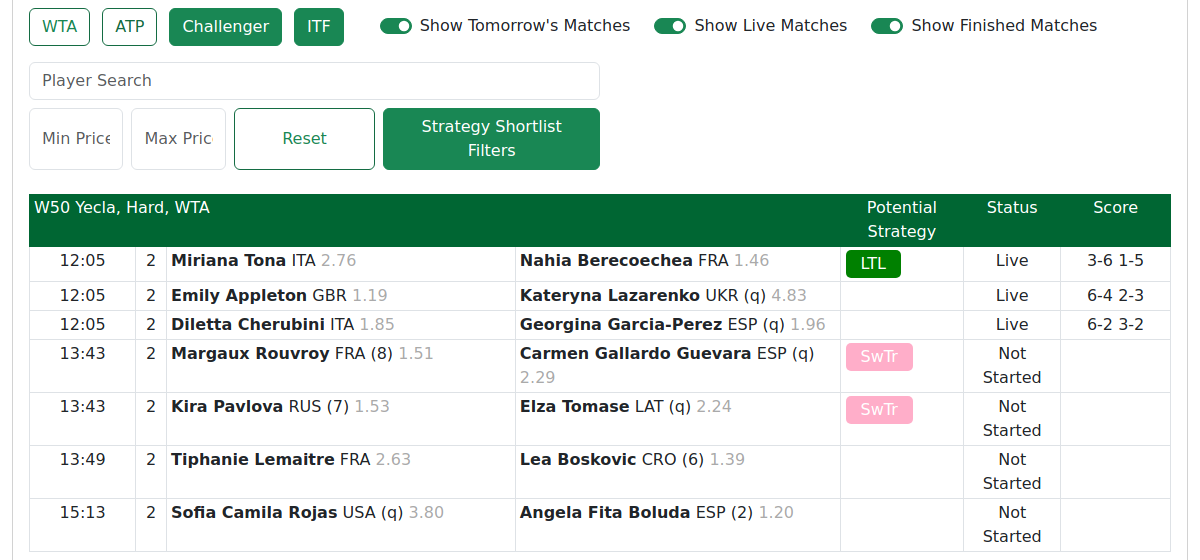
Tour-type buttons work as inclusions — they switch levels on, they don't switch them off.
- All buttons on (the default) = every tour shows.
- Turning a button off removes that category from the list.
Worked example: you only want Challenger and ITF matches today. Turn WTA and ATP off — the list now hides WTA Tour and ATP Tour matches and shows only Challenger and ITF.
Good to know
- The list keeps itself up to date while you're viewing it. Leave the tab open and it stays current; a background tab pauses until you return to it.
- Past matches on a chosen day drop off the list rather than greying out.
- Opening a match: a normal click opens it in a new tab; Shift+Click opens it in the same tab.
Tips & Tricks
- Time toggles are the opposite — they're normal show/hide switches (check "Tomorrow" to include tomorrow's matches).
- Use Min/Max price to find matches in an odds range you like — it keeps a row if either player fits.
- Shift+Click opens a match in the same tab instead of a new one.
Note — the list stays current on its own while the tab is open. A background tab pauses until you switch back to it.
FAQ
Can I look at past days or only today and tomorrow? Only today or tomorrow matches are displayed. Past matches can be seen via the player and/or match stats detail pages.
Why did a match I saw earlier disappear from the list? Past matches on a selected day drop off the list, or a filter you set is hiding it. Check your filters.
Does the list update on its own while I watch it? Yes, while the tab is open and visible. A background tab pauses until you return.
What are the Strategy filters and why can't I see them sometimes? They flag matches fitting a trading strategy (see Reading Stats & Filters). They are not available on every match and are hidden on the Live tab.
How does the Min/Max price filter decide which matches to keep? It keeps a row if either player's odds fall inside the band you set.
Are today's finished results in here too, or only upcoming matches? Both — use the Time toggles (Finished / Live / Tomorrow) to choose what shows.
Next: Live Matches, or jump straight into the Match Page.