Men's & Women's Stats
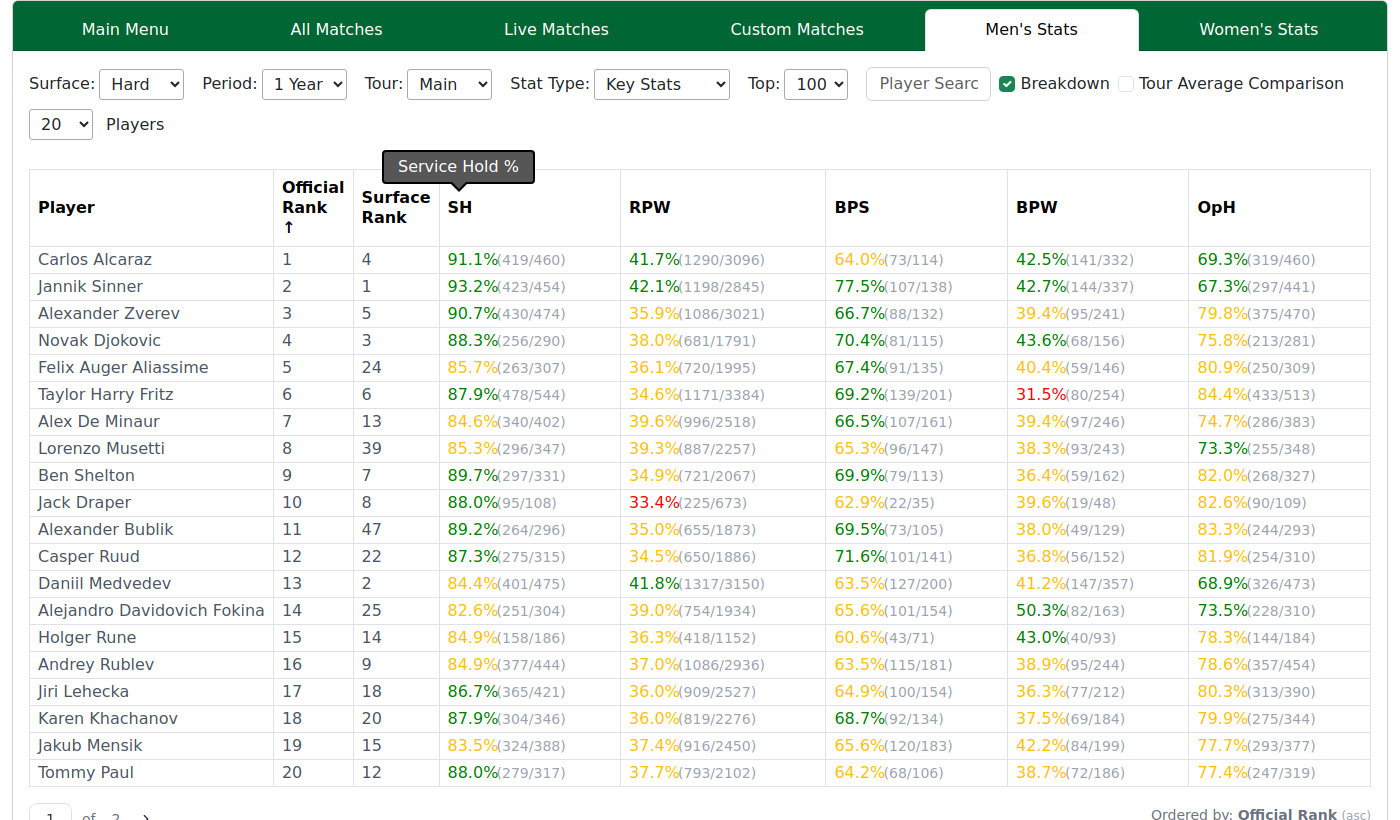
These two tabs are the overall stats/rankings view: a big sortable table of player form. They work identically — one covers men's performance, the other women's — so this page describes both.
The identity columns
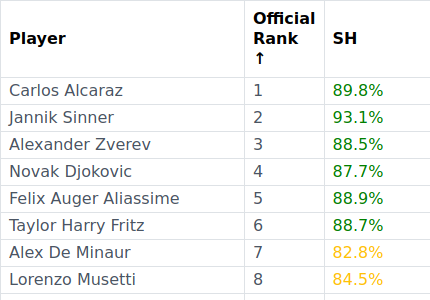
| Column | Meaning |
|---|---|
| Player | Player name |
| Official Rank | Official published ranking |
| Surface Rank | Our own surface ranking (TP Ranking) |
| Remaining Columns | Performance based on the selection in 'Stat Type' dropdown |
The stat blocks
The rest of the table is grouped into stat blocks, each showing percentage, with optional wins / losses and tour average comparison
Plus strategy-oriented blocks (Back the Server, Lay the Leader, and so on). Every column header has a tooltip explaining it; the full definitions live in the Stat Glossary.
Filters and display options

- Period — how far back to measure (All, Last Week … Last 2 Years).
- Surface — All, Hard, Clay, Grass, Indoor. Choosing a surface also switches which colour levels are used.
- Tour — Which level of tour the data is displayed for.
- Stat Type — Based on the Match Stats stat blocks.
- Top x — Select how much ranking depth you want to view.
- Breakdown — Display the number of wins/losses for a given stat.
- Tour average comparison — how far above/below the tour average a player is.
- Page size — 10 / 20 / 50 / All. Your choice is remembered.
Stat Type — what each group shows
The Stat Type dropdown swaps the block of stat columns on the right of the table. Each option is a themed set of serve/return or match-shape numbers, all shown as percentages over the Period, Surface and Tour you've chosen. Pick the angle you want to rank the field by:
| Stat Type | What's inside | When to use it |
|---|---|---|
| Key Stats | Service Hold %, Return Points Won %, Break Point Save %, Break Point Won %, Opponent Hold % | The five headline serve-and-return numbers — the fastest read on who serves well and who returns well. |
| Other Stats | Win First Set %, Service Points Won %, 1st Serve %, 1st Serve Points Won %, 2nd Serve %, 2nd Serve Points Won %, Return Games Won %, Tie-breaks | The detail behind the headlines — see how a player builds (or leaks) their serve and return numbers. |
| Break of Serve | Broken in first service game, broken then breaks back before the set ends, wins the first break, immediately broken back after breaking, breaks then broken back before the set ends | Momentum around breaks — spot players who create breaks versus those who hand them straight back. |
| Serve for Set | Holds at 5-4, broken serving at 5-4 and loses the set, holds to win the set, holds to stay in the set | Closing-out reliability — who finishes sets on serve and who wobbles under pressure. |
| After Set 1 | Won set 1 → won in two, won set 1 → won the match, lost set 1 → won set 2, lost set 1 → won the match, plus early-break scenarios in set 2 | Best-of-three momentum after the opening set — separates front-runners from comeback players. |
| Third Sets | Won set 1 (or set 2) then won in three, and break-then-broken-back swings in set 3 | Deciding-set temperament in best-of-three — find the strong closers and the shaky ones. |
After Set 1 and Third Sets describe best-of-three matches, so they're most meaningful for events played over three sets.
Drilling into a player
Click a player's name to open their Player Page for the full picture — surface ranks, ranking history and a filterable match record.
Note — hover any column header for a one-line definition; the full list is in the Stat Glossary.
Notes
- Colour coding is the quickest read. Each stat cell is shaded green / amber / red to show how strong the number is. It is direction-aware: for most stats greener is better, but for the few where a low value is good the scale flips. Changing the Surface or Tour re-bases the colours for that context, so the same number can shade differently from one surface to the next.
- Breakdown adds the raw wins / losses behind each percentage.
- Tour average comparison shows how far above or below the typical player each value sits. It is mutually exclusive with Top x comparison, which compares against the top group instead — turning one on turns the other off.
- Page size & sorting. Choose how many rows to show (10 / 20 / 50 / All); your choice is remembered. Click any column header to sort by it.
- These tables update when you change a filter or reload the page — they do not update on their own while you watch.
FAQ
What's the difference between Official Rank and Surface Rank? Official Rank is the published tour ranking. Surface Rank is our own ranking for the surface you've selected — pick Clay and a clay specialist rises above their official spot. Sort on Surface Rank when you want the surface picture.
What do the green, amber and red cell colours mean? They show whether a number is strong (green), average (amber) or weak (red) for that stat — not how the player ranks. For a few stats a low number is the good one, so there green sits at the low end.
Why do the cell colours change when I turn on "Tour average comparison"? With it on, the green/amber/red quality bands switch off and the colour moves to the +/- figure instead: green means the player is above the tour average for that stat, red means below. So the same colours now answer "better or worse than average?" rather than "strong or weak number?".
What's the difference between the "Top" filter and the "Players" per-page dropdown? Top picks which players qualify — the rank cutoff (Top 50 = only the top-50 ranked). Players just sets how many of those are shown per page. So Top 100 / Players 20 = 100 qualify, viewed 20 at a time; changing Players never changes who's in the table.
How do I sort the table, and does it remember my page size? Click any column header to sort; click again to reverse. Your page size (Players per page) is remembered next time. It's separate from Top, which sets how many players qualify in the first place.
How do I open a single player's full record from here? Click the player's name — their Player Page opens in a new tab, so the leaderboard stays as you left it.
Do these numbers update on their own, or must I reload? The table updates the moment you change a filter — no "apply" button. It won't change on its own while you watch; the figures update on a regular schedule.