Getting Started
Welcome to the tennis stats site. This is where you will find upcoming and recent matches, dig into any player's form, and read the numbers behind every matchup.
This guide is intuitive: find the section, look at the answer, get back to your day. Start here to learn the layout and vocabulary that every other page uses.
The five tabs
Everything on the home page lives under one of five tabs along the top.

| Tab | What it's for |
|---|---|
| All Matches | The default landing tab — every match for the selected day. See All Matches. |
| Live Matches | Matches in play right now, with live scores. See Live Matches. |
| Custom Matches | Build a "what-if" comparison between any two players. See Custom Matches. |
| Men's Stats / Women's Stats | Leaderboard-style tables of player statistics. See Men's & Women's Stats. |
The site remembers which tab you were last on and returns you there next visit.
Page anatomy
Most screens share the same shape: a header at the very top, the tab bar beneath it, then either a match list (home tabs) or a detail page (match or player), each with its own filter bar.
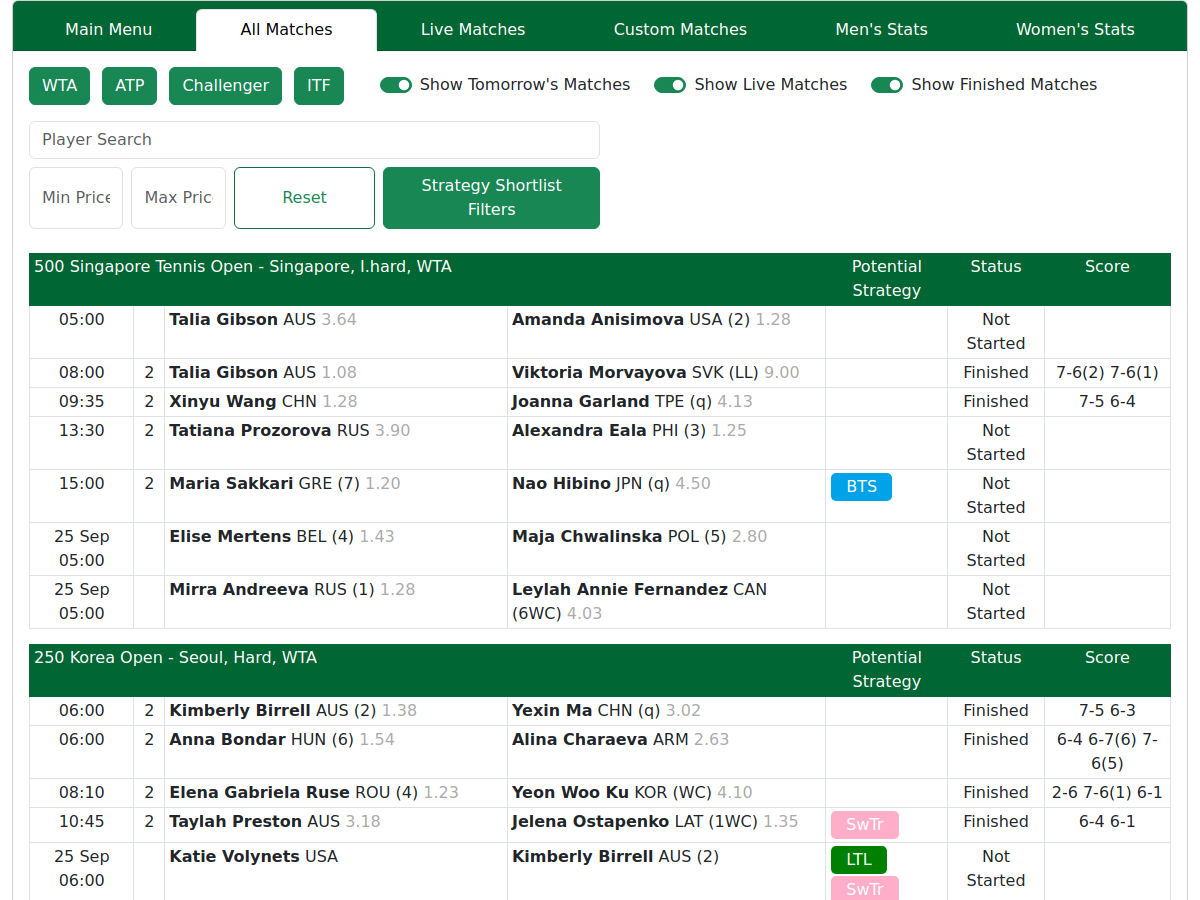
How to read a match row
A single row in the All Matches list packs a lot in. Left to right you get the time, the round, each player's name with their country and seeding, the odds, and — for matches under way — the live score.

- Time. Shown in your own local time, automatically — no setting to
change. A plain
HH:mm(e.g.14:30) means today; a date prefix (e.g.3 Sep 14:30) means another day. - Round. The second column — how deep into the event the match is. A bare
1/2= first/second round; letters likeQF,S,F= quarter-final, semi-final, final. Full list in All Matches. - Player name, country and tag. After the name and 3-letter country you may
see a bracket tag: a plain number
(1)is the player's seed; a letter code like(WC)or(Q)is how they entered the draw. Full list in All Matches. - Odds. A decimal price per player. Lower = the favourite. More in Odds & Rankings.
- Score. The set-by-set score for matches in play or finished, read left to right. More in All Matches.
Getting into a player
Click any player's name from the Men's/Women's Stats tabs to open their Player Page; click on a match row in the 'All Matches' tab to open the full Match Page. A normal click opens the match in a new tab; hold Shift while clicking to open it in the same tab. In the Match Stats page, click a player name to open their Player Page
What each part of the guide covers
- New here? You're in the right place — finish this page, then read Reading Stats & Filters.
- Want the daily process? All Matches.
- Want the deep detail on one or more matches? Match Page — the richest page on the site.
- Confused by an abbreviation? Jump to the Stat Glossary.
Looking for the full system-building and backtesting tools? That's System Builder, which has its own separate manual. See the 'Help' section of the menu.
Tips & Tricks
- Start on All Matches. It's the default tab and the daily hub — everything else branches off it.
- Shift+Click a match to open it in the same tab instead of a new one.
- Learn four stats first — SH, SPW, RPW, BPW — and most of what you read makes sense. Full list in the Stat Glossary.
Note — times are always local. Every time on the site is shown in your own device's time zone, automatically. There's nothing to set.
FAQ
Which tab should I start on as a new member? All Matches — it's the default and shows every match for the day. Get comfortable there, then open a Match Page.
What time zone are the match times in — mine or the site's? Yours. Times convert to your own local time automatically; there's no zone setting.
How do I get from a match to a single player's page? Open the match page by clicking in the row and then, on the Match page, click the player's name.
Does the site work on my phone, and does anything change on mobile? Yes. Wide tables scroll sideways or stack to fit a smaller screen.
How current are the numbers I'm looking at? Home lists keep themselves up to date while you view them; live scores update with a short delay; match and player pages show the figures as of when you opened them — reload for newer numbers. All data are completely current.
What's the difference between the stats tabs and the match pages? The Men's & Women's Stats tabs are leaderboards across many players; a Match Page is the deep detail on one matchup.